
Yes, and since you’re building a long-term website, I’d polish it to read like it was written by an experienced Business Analyst, not an AI or a textbook. Below is a version that is SEO-friendly, engaging, and natural while still targeting the keyword “Data Modeling for Business Analysts.”
Data Modeling for Business Analysts: A Complete Beginner’s Guide (2026)
Estimated Reading Time: 12 minutes
Introduction
Have you ever worked on a project where the final product didn’t match what the business expected? More often than not, the issue isn’t the technology. It’s a misunderstanding of the data and how it should work.
As Business Analysts, we spend a lot of time gathering requirements, facilitating workshops, and documenting business processes. However, one skill that often separates good Business Analysts from great ones is data modeling.
Many people think data modeling is only for database developers or data architects. While those roles certainly rely on it, Business Analysts use data modeling to understand business information, uncover missing requirements, validate business rules, and communicate ideas clearly with both stakeholders and technical teams.
A well-designed data model reduces ambiguity, improves collaboration, and helps teams build the right solution the first time.
In this guide, you’ll learn what data modeling is, why it’s important for Business Analysts, the different types of data models, real-world examples, common mistakes, best practices, and the tools commonly used in projects.
What Is Data Modeling?
Imagine you’re building an online banking application. Before developers write a single line of code, everyone needs to agree on what information the system should store, how that information is connected, and the rules that govern it.
That’s exactly what data modeling helps accomplish.
Data modeling is the process of organizing business information into a structured format that shows entities, attributes, relationships, and business rules. It provides a visual blueprint that helps everyone understand how data should flow through the system.
For a Business Analyst, data modeling is much more than drawing boxes and connecting lines. It’s about translating business requirements into a structure that developers can build, testers can validate, and stakeholders can understand.
A good data model answers questions such as:
- What information does the business need?
- Which fields are mandatory?
- How are different pieces of information related?
- What business rules should the system enforce?
- How will data move between different systems?
When these questions are answered early, projects are far less likely to experience costly changes later.
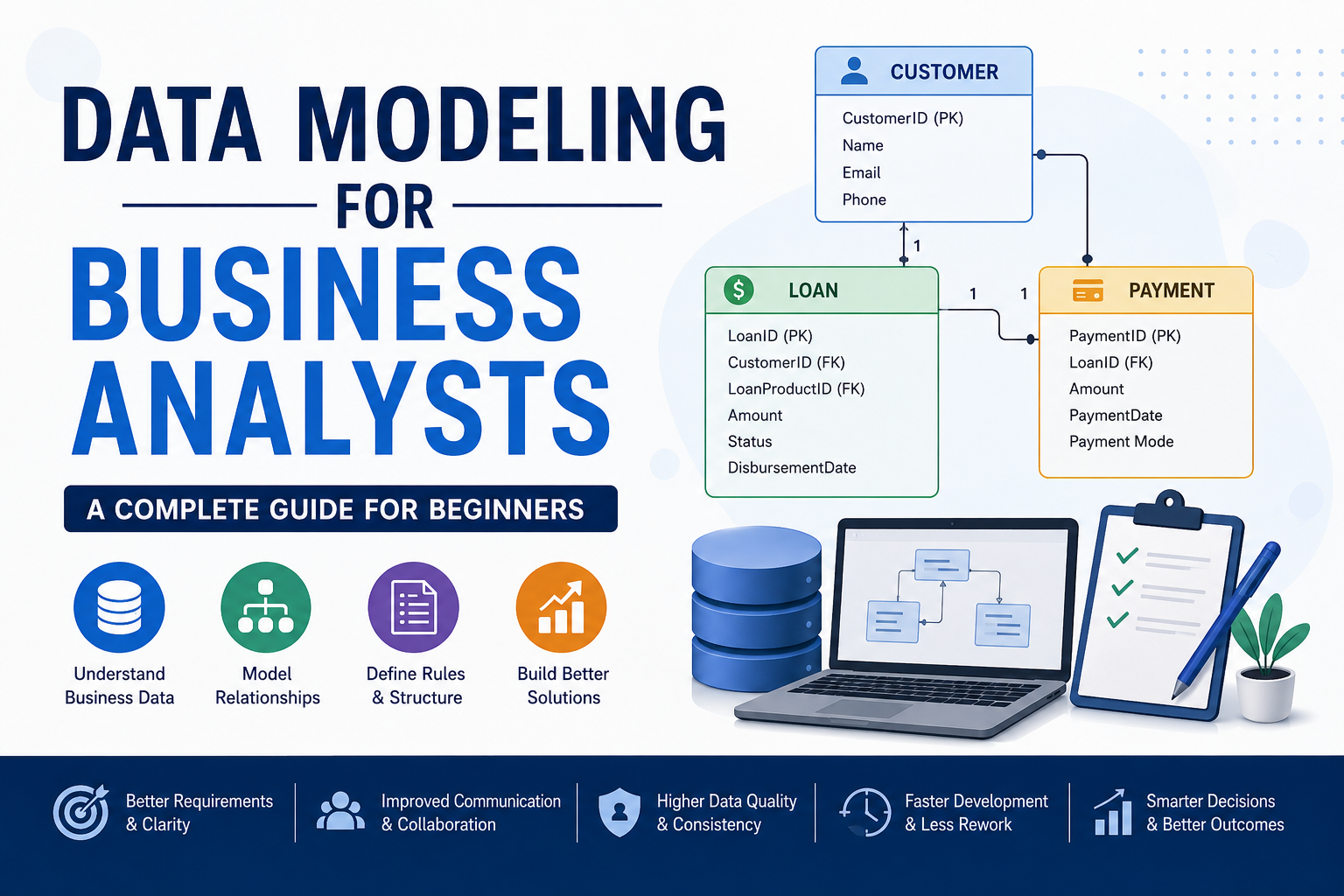
A Simple Example
Let’s take a Loan Management System.
A customer applies for a loan.
Each customer can have multiple loans.
Each loan can have multiple payments.
Customer
    │
    │ 1
    │
    │ N
Loan
    │
    │ 1
    │
    │ N
Payment
This simple diagram communicates the relationship much more effectively than several paragraphs of documentation.
Why Is Data Modeling Important for Business Analysts?
Business Analysts serve as the bridge between business stakeholders and technical teams. Data modeling strengthens that bridge by giving everyone a shared understanding of the information the system will manage.
Here are some of the biggest benefits.
1. It Removes Ambiguity
Stakeholders often describe the same business process in different ways. Creating a data model helps uncover missing information and assumptions before development begins.
For example, if a stakeholder says, “A customer can apply for a loan,” the Business Analyst should ask questions such as:
- Can a customer have multiple loans?
- Can two customers share one loan?
- Can a closed loan be reopened?
- Can a loan exist without a customer?
These discussions lead to more accurate requirements.
2. It Improves Communication
Data models create a common language between business users, developers, testers, architects, and product owners.
Instead of interpreting lengthy requirement documents differently, every team refers to the same visual model.
3. It Improves Requirement Quality
While building a data model, Business Analysts often discover:
- Missing entities
- Duplicate information
- Missing attributes
- Incorrect relationships
- Incomplete business rules
Finding these gaps during analysis is much less expensive than fixing them after development has started.
4. It Supports Better Testing
A good data model helps QA teams verify:
- Mandatory fields
- Validation rules
- Relationships
- Data integrity
- Business rule compliance
This results in fewer production defects.
5. It Makes Future Changes Easier
Business requirements change constantly.
A well-structured data model makes impact analysis much easier by showing exactly which tables, APIs, reports, and business processes will be affected by a change.
Key Components of a Data Model
Understanding these building blocks is essential for every Business Analyst.
Entity
An entity represents a business object.
Examples include:
- Customer
- Employee
- Loan
- Product
- Order
- Invoice
Attribute
Attributes describe an entity.
For example, a Customer entity may include:
- Customer ID
- Name
- Email Address
- Phone Number
- Date of Birth
Primary Key (PK)
A Primary Key uniquely identifies each record.
Example:
CustomerID
Every customer has a unique Customer ID.
Foreign Key (FK)
A Foreign Key creates a relationship between two entities.
Example:
Loan Table
CustomerID
This tells the system which customer owns the loan.
Relationships
Relationships define how entities connect.
One-to-One
One employee is assigned one company laptop.
One-to-Many
One customer can have multiple loans.
Many-to-Many
One student can enroll in multiple courses.
One course can have multiple students.
Types of Data Models
Business Analysts typically work with three levels of data modeling.
Conceptual Data Model
This is the highest-level view of the business.
It focuses only on business entities and their relationships without technical details.
Example:
Customer
↓
Loan
↓
Payment
Conceptual models are useful during stakeholder discussions and project initiation.
Logical Data Model
The logical data model provides more detail and is the model Business Analysts work with most often.
It includes:
- Entities
- Attributes
- Primary Keys
- Foreign Keys
- Business Rules
- Relationships
Logical models help validate requirements before development begins.
Physical Data Model
The physical data model describes how information will actually be stored in the database.
It typically includes:
- Table names
- Column names
- Data types
- Indexes
- Constraints
- Database-specific implementation details
Database developers and data architects usually create physical models.
How Business Analysts Use Data Modeling Throughout the SDLC
Initiation
During the early stages of a project, Business Analysts identify:
- Business objectives
- High-level business entities
- Project scope
- Major relationships
Requirements Gathering
Business Analysts define:
- Attributes
- Mandatory fields
- Optional fields
- Validation rules
- Business rules
- Relationships
Analysis and Solution Design
During analysis, Business Analysts create:
- Conceptual Data Models
- Logical Data Models
- Entity Relationship Diagrams (ERDs)
- Data Dictionaries
These artifacts help validate requirements with stakeholders before development begins.
Development
Business Analysts support developers by explaining:
- Data relationships
- Field definitions
- API mappings
- Validation logic
- Business rules
Testing
Business Analysts work closely with QA teams to verify:
- Data integrity
- Field mappings
- Referential integrity
- Business rule validation
Production Support
Even after deployment, data models remain valuable for:
- Impact analysis
- Data migration
- Root cause analysis
- Future enhancements
- Regulatory changes
Real-World Example: Loan Management System
Imagine a bank wants to build a Loan Management System.
The Business Analyst identifies the following entities:
- Customer
- Loan
- Loan Product
- Payment
- Branch
- Employee
The relationships might look like this:
- One Customer can have multiple Loans.
- One Loan belongs to one Loan Product.
- One Loan can have multiple Payments.
- One Branch manages multiple Loans.
- One Employee can process multiple Loans.
The Business Analyst also documents important business rules.
- A customer must exist before creating a loan.
- Every loan must belong to one loan product.
- Payment amount cannot exceed the outstanding balance.
- Closed loans cannot accept new payments.
- Customer ID is mandatory.
Without this structure, developers may make assumptions that lead to defects or expensive redesigns later in the project.
Common Data Modeling Deliverables
Business Analysts often create or contribute to:
- Entity Relationship Diagrams (ERDs)
- Conceptual Data Models
- Logical Data Models
- Data Dictionaries
- Data Flow Diagrams (DFDs)
- Field Mapping Documents
- CRUD Matrices
- Data Lineage Documentation
- Business Rules Catalog
Common Mistakes New Business Analysts Make
Learning data modeling takes practice, and most Business Analysts make a few common mistakes early in their careers.
Some of the most frequent ones include:
- Jumping into technical design before understanding the business process.
- Missing mandatory fields or validation rules.
- Creating unnecessary entities that add complexity.
- Ignoring business rules during modeling.
- Failing to review the data model with stakeholders.
- Assuming developers will fill in missing details later.
A simple, well-validated model is usually more valuable than a complex one that no one understands.
Best Practices for Business Analysts
To create effective data models:
- Start with the business process, not the database.
- Ask questions until relationships are completely understood.
- Keep diagrams simple and easy to read.
- Use consistent naming conventions.
- Document business rules alongside the model.
- Validate the model with stakeholders before development begins.
- Update the model whenever requirements change.
- Work closely with developers, architects, and QA teams throughout the project.
Frequently Asked Questions
Is data modeling the responsibility of a Business Analyst?
Business Analysts are not usually responsible for designing production databases, but they play a major role in creating conceptual and logical data models that accurately represent business requirements.
Do Business Analysts need SQL to perform data modeling?
Basic SQL knowledge is helpful because it improves your understanding of how data is stored and queried. However, advanced SQL skills are not required to create logical data models.
Which tools are commonly used for data modeling?
Popular tools include Microsoft Visio, Lucidchart, Draw.io, dbdiagram.io, ER/Studio, PowerDesigner, Enterprise Architect, and Microsoft Visio.
What is the difference between an ERD and a data model?
An Entity Relationship Diagram (ERD) is a visual representation of entities and their relationships. A data model is broader and includes the ERD along with business rules, definitions, attributes, validations, and supporting documentation.
Key Takeaways
If there’s one thing to remember, it’s this: data modeling is not just a technical exercise. It’s a business analysis skill that helps teams understand requirements, communicate effectively, and build solutions with confidence.
Whether you’re working on banking applications, healthcare platforms, insurance systems, or e-commerce websites, a solid data model lays the foundation for better software.
As a Business Analyst, investing time in learning data modeling will improve the quality of your requirements, strengthen collaboration with technical teams, and help you deliver solutions that are accurate, scalable, and easier to maintain.